An AI influencer is a face you own. It doesn't negotiate rates, miss a shoot date, or take your product brief and post something off-brand. But the thing that separates a persona people follow from a folder of pretty renders is boring and specific: the same face has to come back, generation after generation, for months. This guide walks the whole build in Pixla — from the first decision to a locked, reusable character — with screenshots of every screen you'll touch.
What an AI influencer actually is
Strip away the marketing and it's three things stacked together: a consistent likeness, a voice, and a point of view. Drop any one and the whole thing stops working. A consistent face with no point of view is a stock model. A strong point of view with a face that shifts every post is a stranger each time, and audiences notice long before they can say why.
That's why the identity gets built once, deliberately, and then reused — rather than re-prompted from scratch for every piece of content. Everything below is in service of that one idea.
Decide the job before you design the face
Three questions, answered before you open the tool. They take ten minutes and they determine every setting you'll pick later.
- What is this persona for? An ongoing social character, a spokesperson for paid ads, or a catalogue model who wears the product? An ad persona can be striking and a little aspirational. A social character has to be someone people want to hear from twice a week, which is a different and harder brief.
- Who is it for? Age, region, language, and what they already see in their feed. This drives appearance, accent, and wardrobe far more than your own taste should.
- Where does it live? Vertical short-form, feed posts, and YouTube pre-roll want different framing. Decide the primary surface now so you generate in the right shape instead of cropping later and losing the top of a head.
Write the answers down. In the next section you'll be asked for a description, and "warm, upbeat skincare creator who speaks plainly and never oversells" is a usable brief. "Pretty girl, 25" is not.
Step 1: Open Influencers and pick a starting point
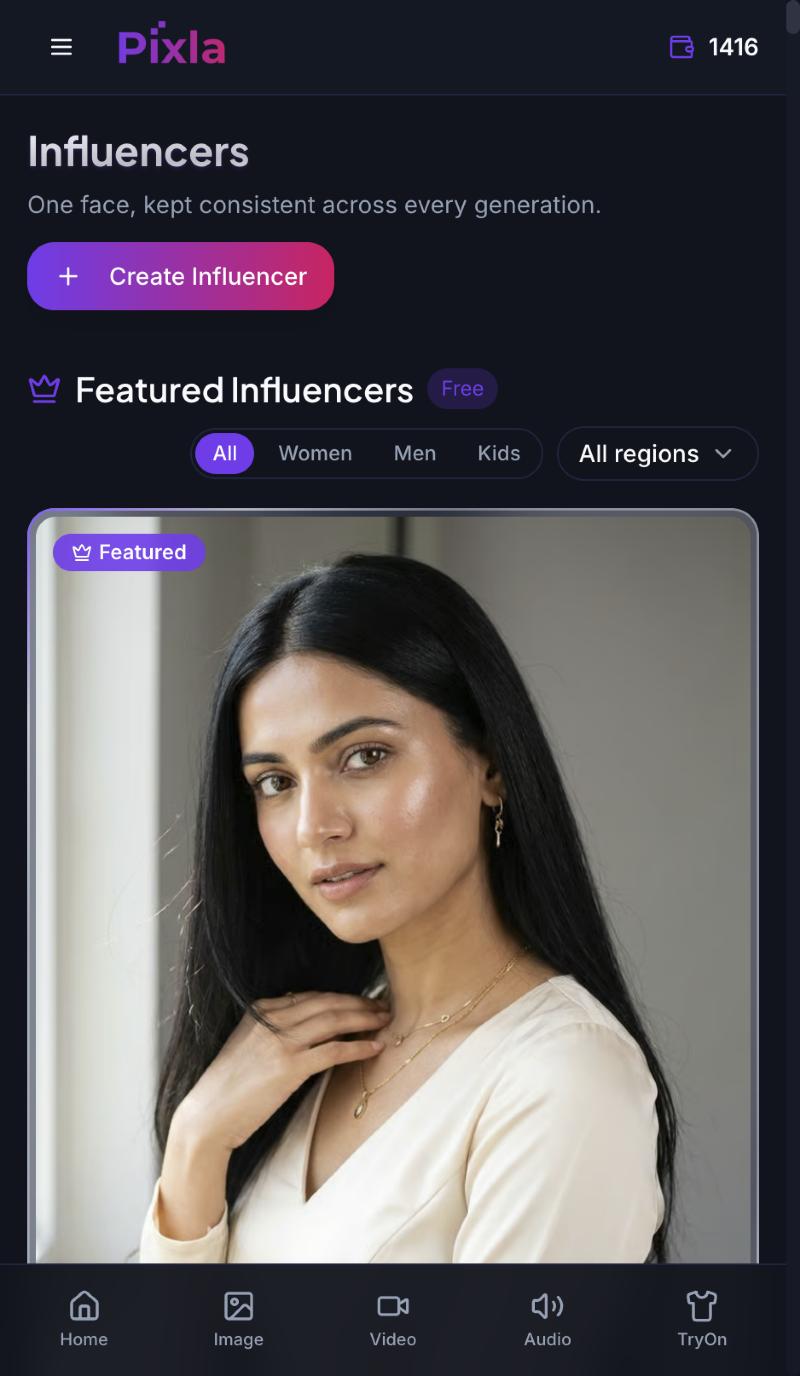
Go to Influencers. The tagline on the page is the whole product promise — one face, kept consistent across every generation.
You have two honest options here. The Featured Influencers library is free and filterable by women, men, kids and region; pick one and you can be generating in under a minute. The trade-off is that it isn't exclusive to you. If this persona is going to carry a brand, build your own with Create Influencer and keep the face yours.
Step 2: Choose how the character is born
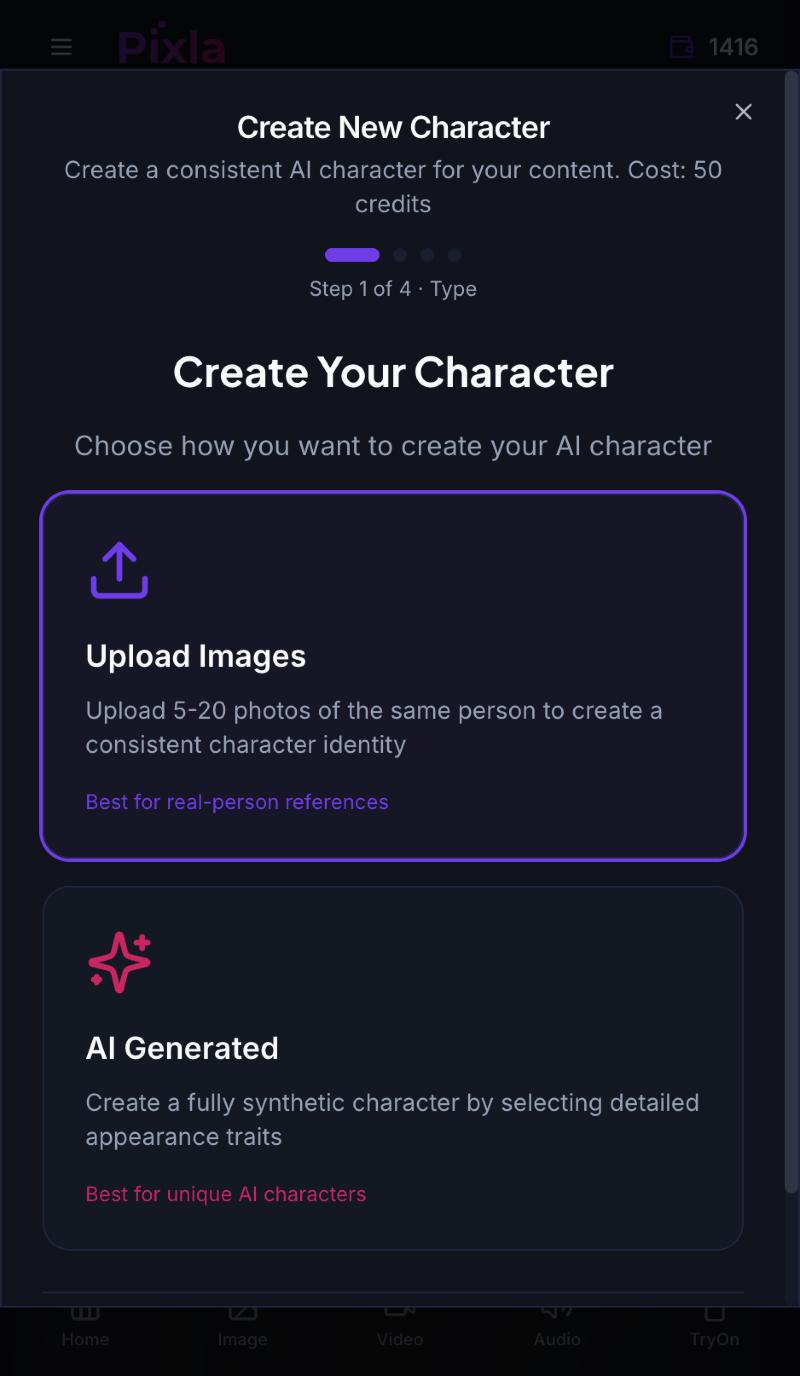
Create Influencer opens a four-step wizard. The first step is the fork in the road, and it's worth understanding properly because you can't casually undo it later.
- Upload Images — 5 to 20 photos of the same person. This builds the identity from a real face, so it's the route for a founder, a staff member, or a model who has signed off on it. More angles and lighting conditions give a more robust identity than twenty near-identical selfies.
- AI Generated — a fully synthetic person assembled from appearance traits you choose. Nobody's likeness is involved, which sidesteps the consent question entirely and is why most brands building a persona from nothing should start here.
One rule that isn't negotiable: if you upload a real person's photos, you need their permission in writing. A likeness you don't have rights to is a legal problem that scales as fast as your content does. We cover where that line sits in face swap vs deepfake.
Step 3: Name the character and give it a voice
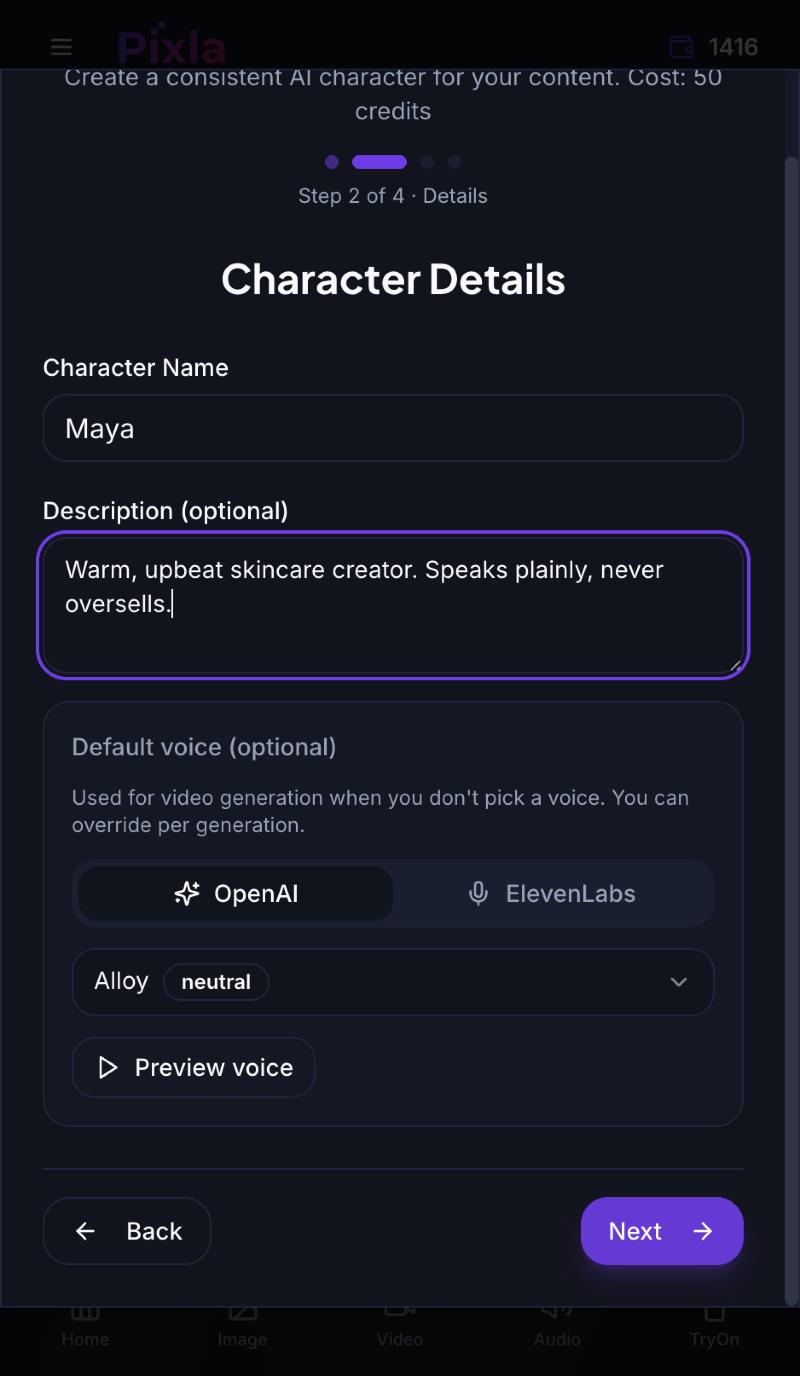
Step 2 asks for a name, an optional description, and a default voice. All three matter more than they look.
The description is not decoration — it's the brief that keeps tone consistent when you or a teammate come back in three months having forgotten what this persona was supposed to sound like. Write it as personality and constraint, not appearance: you already handle appearance in the next step.
The default voice is the one used for video generation whenever you don't pick a different one, and you can still override it per generation. You get OpenAI and ElevenLabs voices, and there's a preview button — use it. Reading a voice name tells you nothing; hearing it next to your description tells you immediately whether the pairing works. A warm, plain-spoken brief attached to a crisp corporate read produces a persona that feels subtly wrong in every video you ever make with it.
Step 4: Design the face and body
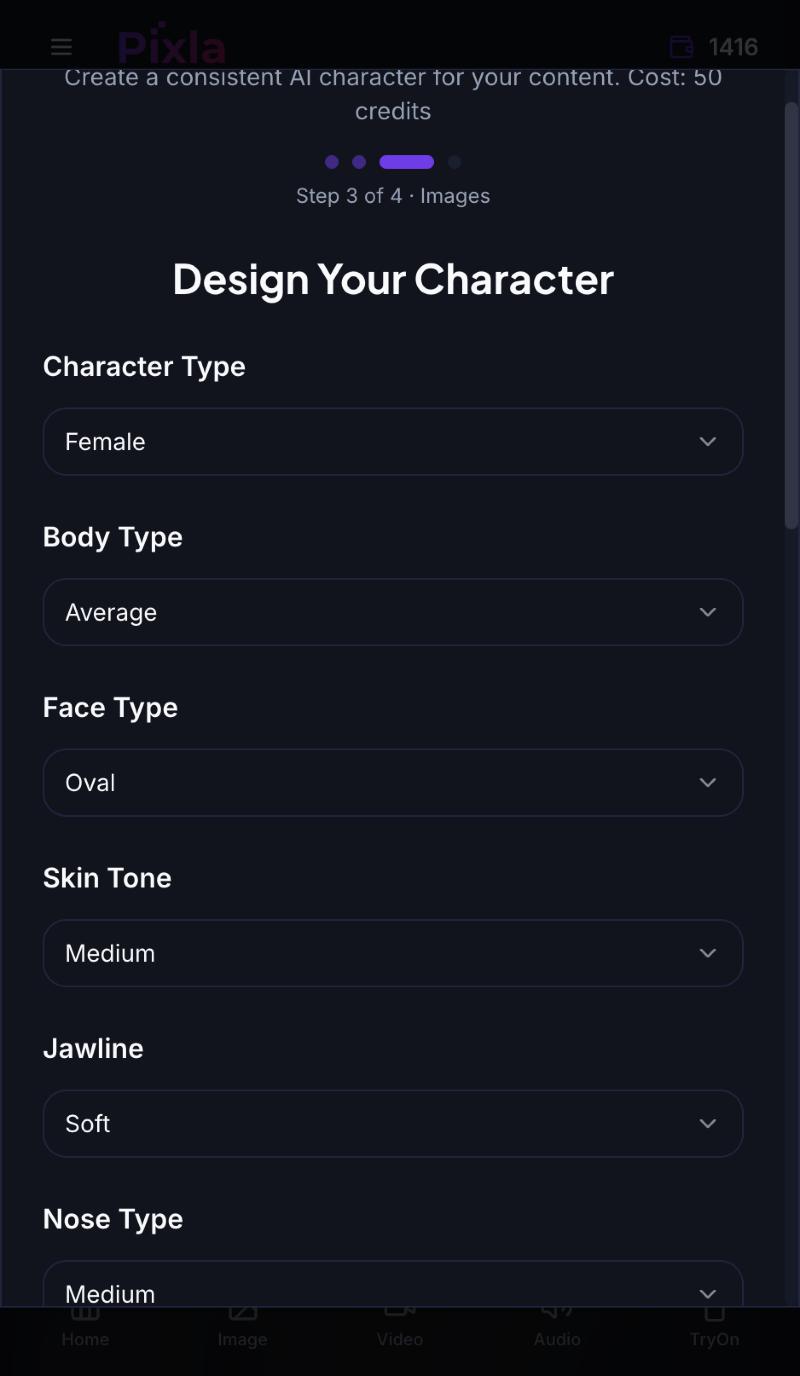
Step 3 is where the synthetic route earns its keep. Rather than hoping a paragraph of prompt text lands the same way twice, you set the traits explicitly: character type, body type, face shape, skin tone, jawline, nose, eye shape, hair style and colour, age bracket, accent, and overall style.
Two pieces of advice that will save you a regeneration cycle. First, pick distinctive combinations, not maximally attractive ones — a slightly unusual pairing of features is far more recognisable in a feed, and recognition is the entire point of a recurring persona. Second, match the traits to the audience you wrote down earlier, including region and accent. A persona selling to one market in the generic look of another converts worse, and the fix costs nothing at this stage and a full rebuild later.
Step 5: Generate previews and lock the identity
The final step generates a set of preview images — five by default — and creating the character costs 50 credits. Don't accept the first sheet out of politeness. You are choosing a face you may publish hundreds of times, so look for the one where the features stay stable across all the previews rather than the single most flattering frame. A face that drifts between previews will drift in production too.
Once saved, the character becomes selectable everywhere in the product — image generation, talking videos, try-on, and ad creative. That's the payoff for doing this properly: the identity is now an asset you pick from a list rather than a prompt you hope reproduces.
The character sheet most people skip
The tool holds the face and the voice. It does not hold the editorial judgement, and that's what goes wrong three weeks in when the persona starts posting things that don't sound like itself. Keep a short document alongside the character covering:
- Backstory and context — where they live, what they do, why they'd know about your category.
- Content pillars — the three or four things this persona talks about, and nothing else.
- Voice rules — sentence length, humour, whether they use slang, what they never say.
- Boundaries — topics the character stays away from. Decide these when you're calm, not mid-news-cycle.
- Disclosure wording — the exact line you use to say this is AI, so it's consistent everywhere.
Mistakes that cost the most time
- Re-prompting instead of reusing. If you describe the person again each time, you get a family resemblance, not a person. Save the character and select it.
- Designing for yourself. The face that appeals to you and the face that converts your audience are frequently not the same face.
- Skipping the voice preview. It's a ten-second check that prevents every future video sounding slightly off-brief.
- Leaving disclosure until later. Retrofitting "this is AI" onto an audience that assumed otherwise is far worse than saying it from the first post.
- One persona for every market. Build a small roster instead — it's cheaper than trying to make a single face work everywhere.
What it costs
Creating a character is 50 credits, and the Featured Influencers library is free if you want to test the workflow before committing to a build of your own. Generation after that is priced per asset, so the realistic way to budget is per campaign rather than per month: a persona plus a first batch of images and a couple of talking videos is a small, known number you can decide on before you start. See pricing for current credit packs.
Where to go next
You now have a face that comes back reliably. The next two steps are putting it on camera and making it earn: how to make AI influencer videos covers script, voice and motion, and how to monetize an AI influencer covers the four routes that actually produce revenue.
Frequently asked questions
How do I create an AI influencer?
Open Influencers and choose Create Influencer. The four-step wizard asks how the character is born (upload 5–20 photos of a real person, or generate a synthetic one from traits), then a name, description and default voice, then explicit appearance traits, then a set of preview images. Saving the character costs 50 credits and makes that identity selectable across image, video and try-on generation.
What makes an AI influencer look consistent across posts?
Saving the identity once and selecting it, rather than re-describing the person in a prompt each time. Prompt-based descriptions produce a family resemblance that drifts; a saved character is reused directly, so the same face comes back in every generation.
Can I build an AI influencer from a real person?
Yes — the Upload Images route builds the identity from 5 to 20 photos of the same person, which suits a founder, staff member or a model. You need that person's written permission first; using a likeness you do not have rights to is a legal problem that grows with every post.
How much does it cost to create an AI influencer?
Creating a character costs 50 credits. The Featured Influencers library is free if you want to test the workflow first, and generation after that is priced per asset, so a persona plus a first batch of content is a known number you can budget per campaign.
Do I have to disclose that an influencer is AI-generated?
Disclose it, and decide the exact wording when you build the character so it stays consistent. Retrofitting disclosure onto an audience that assumed the persona was a real person damages trust far more than being clear from the first post.